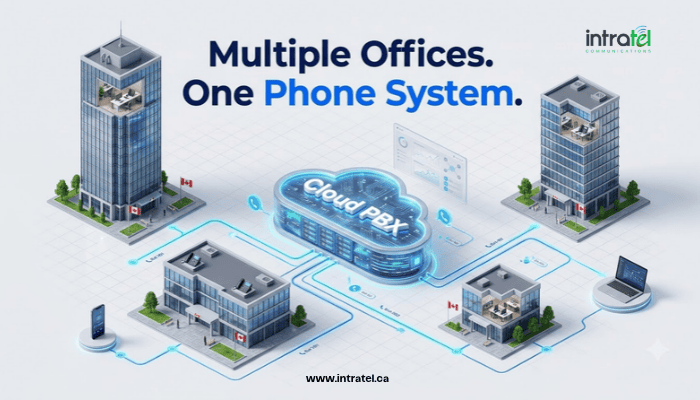
Quick answer: The simplest way to connect phone systems across multiple office locations is to move every site onto one Hosted PBX. Each office becomes a set of extensions on the same cloud system, so staff dial and transfer between locations by extension, callers reach one main number, and an administrator manages every site from one portal.
Why Does a Multi-Location Business Phone System Matter for Growing Companies?
A second office shouldn’t mean a second phone system
A new office usually arrives with its own phone line, its own bill and, often, its own vendor. Before long, each site runs a separate setup, and staff at one location can’t easily reach or transfer calls to another.
What Does Running Separate Phone Systems at Each Location Cost?
Why disconnected offices cost more than the phone bill
Separate systems mean separate providers, invoices, hardware and settings. Intratel saw this with Kodarin Industries and BlueSky Process Solutions, two industrial companies that shared office space yet ran separate phone systems with separate telephone bills until they consolidated onto one platform.
Calls between offices are the second leak. When each site has its own system, a call to a colleague at another location leaves the building as an outside call, and if the offices sit in different calling areas, traditional systems can charge long distance for it. Spectrum Patient Services, a healthcare organization undergoing expansion, reduced its intra-office long-distance calling costs after improving communication between locations.
Callers notice the gaps too: a different number for each branch, transfers that mean hanging up and redialling, and greetings that change with each location.
What Are the Ways to Connect Phone Systems Between Offices?
Networked PBXs, hybrid setups and a single cloud PBX compared
Linked on-site PBXs. Each location keeps its own PBX, connected over a network link so staff can dial between sites. Every site still needs its own hardware, maintenance and configuration. This suits large enterprises and call centres with in-house telecom staff who prefer to manage their own hardware.
SIP trunking and hybrid setups. SIP trunking provides digital phone lines for existing PBX systems, replacing traditional landlines. It can help reduce telephone line costs, but it does not independently provide the centralized call routing features of Hosted PBX. Businesses connecting existing PBX systems across multiple locations may require additional configuration or infrastructure.
Hybrid setups help sites tied to a current provider. MDG Computers needed to retain its existing telephone lines, so Intratel designed a hybrid system that allowed the business to continue using its current services while gradually moving to a new phone system.
Businesses with multiple offices can follow the same phased migration approach, moving one location at a time.
One Hosted PBX. Every phone at every location connects to the same cloud system, managed by the provider, with no PBX hardware on site.
| Feature | Linked on-site PBXs | SIP trunking with an existing PBX | One Hosted PBX |
|---|---|---|---|
| PBX hardware on site | At every location | At every location | None |
| Calls between offices | Via interconnected PBXs | Depends on PBX configuration and connectivity | Internal extension dialing |
| Management | Each system separately | Each system separately | One web portal |
| Adding a new site | New PBX and network configuration | Additional PBX capacity, configuration and connectivity may be needed | Add extensions and connect phones |
| Best fit | Large enterprises and call centres | Sites keeping a legacy PBX | Most small and medium-sized businesses |
How Does a Cloud PBX for Multiple Offices Unify Call Routing?
Features that make separate locations work as one team
Inter-office extension dialling. Staff reach colleagues at another site by extension and transfer callers between locations as easily as down the hall. Because every office is on the same system, those calls stay internal.
One front door, local numbers kept. A main number with a virtual receptionist greets callers and routes them by dial-pad menu to the right location or department. Eligible existing phone numbers can generally be transferred to Intratel’s Hosted PBX, subject to carrier approval and availability. This allows customers in Burlington, Hamilton, Oakville, Mississauga, Brampton and Toronto to continue using familiar business numbers.
Shared coverage across sites. Ring groups and simultaneous ringing let one call reach staff in several offices at once. Call queues hold callers in order during busy periods, and call forwarding sends a closed location’s calls to one that’s open. Staff who move between sites stay reachable through the mobile app.
Centralized call management. With web-based PBX management, an administrator can add, move or change users at any site from one screen, and billing covers every location together. Depending on the plan, call recording and queue reporting can also span all sites. Intratel’s Multi-Site Cloud PBX is built around this setup.
What Does Each Location Need for Multi-Site VoIP?
Bandwidth, QoS and latency checks before offices go live
Size bandwidth for peak calls, not headcount. As a general planning reference, VoIP bandwidth requirements can range from approximately 25 to 80 Kb/s per simultaneous call in each direction, depending on the audio codec and what network overhead is included. Actual requirements may be higher. Quality of Service (QoS) settings help prioritize voice traffic but do not reduce the bandwidth required for each call.
Set QoS at every office. Each site has its own internet connection and router, so a clear call at head office tells you nothing about the branch.
Plan hardware and continuity per site. Each location can run on hardware and/or software, such as desk phones, softphones or a mix. Forwarding rules can route calls to another office or a mobile phone if one site loses internet or power.
How Do You Migrate Multiple Locations to VoIP Without Disrupting Customers?
A site-by-site rollout plan
Start with an inventory. List every number, line, provider, renewal date and call flow at each location. That becomes the blueprint for one unified call plan.
Stagger the cutover. Move one site at a time, port numbers so customers keep dialling what they know, and use a hybrid setup for any site still tied to its current provider.
Train each location. A short session per site on transfers, ring groups and the mobile app prevents confusion later. Professional setup and integration can help minimize disruption during migration.
Plan for the next site. With Hosted PBX, adding another office generally means configuring new extensions and connecting desk phones, softphones or both, without installing another PBX system.
Which Phone System for Multiple Locations Is Right for Your Business?
Key Takeaways
- Separate systems can increase costs: Managing independent phone systems across locations may lead to additional maintenance, administration and calling expenses.
- One Hosted PBX is simplest: For most small and medium-sized businesses, every office becomes extensions on one system.
- SIP trunking supports existing PBX systems: It provides digital phone lines that replace traditional landlines. Connecting multiple offices may require additional PBX configuration or infrastructure.
- Check every site’s network: Bandwidth, QoS and latency need testing location by location.
When you compare providers, ask how easily the next location, or the next home office, can join, and whether the provider is Canadian with local support. Intratel is based in Burlington, focused on the Greater Toronto and Golden Horseshoe region, and serves businesses across Canada.
💬 Common Questions
Can multiple office locations share one business phone number?
Yes. On a Hosted PBX, one main number can greet callers with a virtual receptionist and route them by dial-pad menu to any location or department, while each office can still keep its own local number.
How do you transfer calls between offices?
When every location runs on the same Hosted PBX, staff transfer calls to colleagues at another site by extension, the same way they would within one office. No outside call is needed.
How much bandwidth does each office need for VoIP?
As a general planning reference, allow approximately 25 to 80 Kb/s per simultaneous VoIP call in each direction, depending on the audio codec and network overhead included in the estimate. Actual bandwidth requirements may be higher. Multiply the expected bandwidth per call by the maximum number of simultaneous calls at each location, and configure Quality of Service (QoS) to prioritize voice traffic.
Can each location keep its existing phone number?
In most cases, businesses can transfer eligible existing phone numbers to Intratel’s Hosted PBX, subject to carrier approval and availability. Our team can assist with the number-porting process and explain applicable charges before migration.
Ready to Connect All Your Business Locations?
Whether you operate two offices or multiple locations across Canada, Intratel can help bring your business communications onto one Cloud PBX system. Our team will review your existing phone numbers, call routing requirements and internet connections to recommend a suitable setup.
Book Your Free Demo Today through our contact page, or call 1-866-409-VoIP (8647).