Quick Answer: A Hosted PBX does not require an on-site PBX server or phone system hardware. You still need devices for your team, such as IP desk phones, softphones, or mobile apps, along with a stable internet connection sized for your busiest calling moments and ideally a router that can prioritize voice. Your provider hosts and manages the PBX platform. Your internet connection and office network remain your responsibility.
What Equipment Does a Cloud Phone System Really Need?
A cloud phone system needs endpoint devices and a reliable network, because the phone system itself runs in your provider’s data centres. Many business owners picture a closet full of equipment and a technician on site for days. With a Hosted PBX, your decisions come down to two questions: what will your people talk on, and can your network carry the calls clearly?
Why “hardware and/or software” is the honest answer
Some roles are still best served by an IP desk phone. Many employees, though, use a softphone on a laptop or an app on their smartphone and never need a desk phone. So the accurate answer to “do you need hardware?” is that you need hardware and/or software, depending on how each person works.
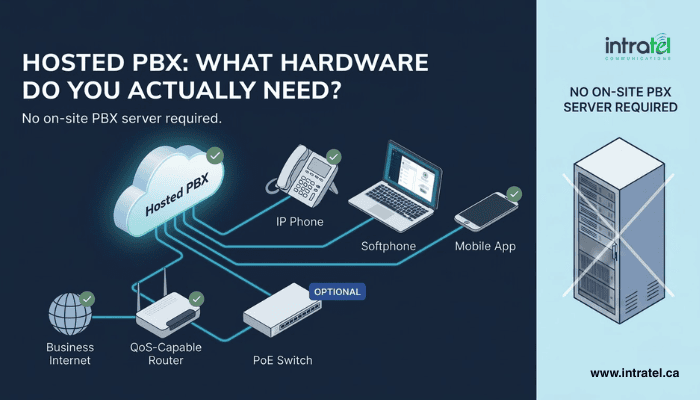
Do You Need On-Premise PBX Equipment for a Hosted PBX?
No. With a Hosted PBX, the phone system runs in the provider’s cloud, so you don’t need a PBX on site. Businesses that prefer to move gradually can keep existing equipment for a while through a hybrid setup.
Where the phone system actually lives
The PBX platform itself is hosted and managed by Intratel on Canadian infrastructure. There is no PBX cabinet or server room for your team to look after, and updates are applied on the provider’s side. For a fuller explanation of the platform, see our guide on what Hosted PBX is and how cloud phone systems work.
Most hosted systems use SIP to set up calls. The IETF describes SIP as a signalling protocol for creating, changing and ending sessions such as Internet telephone calls. Because SIP is an open specification, phones from many manufacturers can work with a hosted system. Your provider will confirm which models it supports before you buy anything.
IP Desk Phones, Softphones or Mobile Apps: Which Business Phone Devices Fit Your Team?
The right business phone device depends on each person’s role. Desk phones suit heavy call handlers, softphones suit office and hybrid staff, and mobile apps suit people on the move.
Matching the endpoint to the role, not the other way around
IP desk phones suit people who are on calls most of the day, such as a receptionist or someone covering a busy inbound line. Dedicated buttons for transfer, hold and park make fast call handling easier.
A softphone app turns a computer into a full business extension. With a good headset, most office and hybrid staff have everything they need.
Mobile app extensions put your business number and core phone features on a smartphone. Staff can call customers from anywhere without giving out their personal numbers. As our article on the risks of employees using personal cell phones for business calls explains, personal numbers cause problems when staff leave.
| Device | Best for | What you need |
| IP desk phone | Reception, high-volume lines | The phone, plus power from a PoE switch or an adapter |
| Softphone app | Office and hybrid staff | Your existing computer and a headset |
| Mobile app | Field and remote staff | Your existing smartphone |
Most small and medium businesses end up with a mix. For example, a 15-person office might put a desk phone at reception, give softphones to office staff, and use the mobile app for the two people who are usually on the road.
What Business Internet Do You Need for VoIP?
For VoIP, you need enough upload and download capacity for your peak number of simultaneous calls, plus a connection with steady, low delay.
Planning bandwidth around concurrent calls, not headcount
Plan for roughly 25 to 80 Kbps per call in one direction, depending on the codec, with proper Quality of Service (QoS) in place. That range covers the voice stream itself. Once network overhead is added, Cisco measures a compressed G.729 call at 31.2 Kbps and an uncompressed G.711 call at 87.2 Kbps on a typical Ethernet network.
Size your connection for your busiest realistic moment, not your headcount. Ten simultaneous calls at the higher figure need just under 1 Mbps in each direction, plus room for normal data traffic. Check your upload speed as carefully as your download speed, because every call sends audio both ways.
Do You Need a New Router or PoE Switch for Hosted PBX?
A QoS-capable router is recommended, especially when voice shares the connection with other business traffic. A PoE switch only matters if you deploy IP desk phones.
The network gear that makes calls sound clear
A QoS-capable router gives voice priority over large downloads and video meetings on your own network and as calls leave your office. It cannot fix congestion beyond your connection, which is why a steady internet service matters too.
PoE switches power desk phones over the same cable that carries their data. Power over Ethernet was first standardized by the IEEE in 2003 and has been updated since (IEEE). The result is one cable per phone and no power adapters at each desk. Teams using softphones and the mobile app can skip PoE entirely.
Wired and Wi-Fi connections each have a place. Desk phones and heavy softphone users do best on a wired connection. Mobile app users rely on Wi-Fi or cellular data, so check your office Wi-Fi coverage before rollout.
Call forwarding can help you stay reachable during an office outage. Depending on how your system is set up, emergency forwarding can send incoming calls to a backup cell phone, and forwarding rules can reroute calls automatically. Our article on what happens to your business phone system if the internet goes down explains how this works.
What Hardware Can You Skip When You Move to Hosted PBX?
When you move to Hosted PBX, you no longer need an on-site PBX system or the phone closet that houses it, and there is no PBX hardware for your team to maintain.
Keeping hosted PBX setup costs where they belong
Avoid buying more handsets than you need. A quick role-by-role review often shows that softphones or the mobile app cover much of your team, which lowers what you spend upfront.
The switch itself can be smooth. In most cases, number portability allows you to keep your existing business numbers, and professional installation keeps disruption to a minimum, with devices and apps configured before cutover. Our overview of the benefits of professional VoIP setup and integration services covers this stage in detail.
If you plan to keep existing equipment for now, you have two options. SIP trunking provides digital phone lines that work with legacy PBX systems and replace expensive landlines. A hybrid setup lets you move gradually while your current system is phased out.
Hosted PBX Setup Made Simple: The Equipment That Actually Matters
A Hosted PBX needs the right devices for each role, an internet connection sized for concurrent calls, and ideally a router that puts voice first. The phone system itself does not need to live in your office.
A short checklist before you switch
- Devices: Choose desk phones, softphones or the mobile app for each role, and check whether any phones you already own are compatible.
- Internet: Estimate your peak number of simultaneous calls, and check upload capacity and connection stability.
- Network: Check whether your router supports QoS, and add PoE only if you are deploying desk phones.
- Continuity: Review your forwarding rules and backup numbers for outages.
Key Takeaways
- A Hosted PBX does not require an on-site PBX server, because the provider hosts and manages the PBX platform.
- Your devices can be IP desk phones, softphone apps, mobile apps, or a mix matched to each role.
- Plan for roughly 25 to 80 Kbps per call in each direction, depending on the codec, with QoS in place.
- Size internet capacity for peak simultaneous calls, and prioritize a steady, low-delay connection.
- A QoS-capable router is recommended, while PoE switches matter only for desk phones.
Find Out Exactly What Your Business Needs
Not sure which devices your team needs, or whether your internet can handle your call volume? Intratel’s team can review your setup and recommend only what your business needs.
Book Your Free Demo Today, or call Intratel at 1-866-409-8647 for a free consultation. You can also Try It Risk-Free for 30 Days.
💬 Common Questions
Can I use my existing phones with a hosted PBX?
It depends on the phones. Many IP phones can be set up on a hosted system, but compatibility varies by model, so check with your provider before deciding what to keep or replace. Older handsets built for traditional landlines need the same check.
Can I use a hosted PBX without a desk phone?
Yes. A softphone app on a computer or a mobile app on a smartphone works as a full business extension, so many employees never need a desk phone.
How much internet speed do I need for VoIP?
Plan for roughly 25 to 80 Kbps per call in each direction, depending on the codec, with QoS in place. With network overhead, Cisco measures a single call at 31.2 to 87.2 Kbps on a typical office network. Multiply by your peak number of simultaneous calls, and leave room for normal data traffic.
Do I need a special router for VoIP?
A special router isn’t required, but a QoS-capable router is recommended, especially when voice shares the connection with other business traffic.
Does VoIP work over Wi-Fi?
Yes. Softphones and mobile apps work well over Wi-Fi with good coverage. Desk phones and heavy call users get more consistent quality from a wired connection.